

The markdown converter that was missing: paste instead of convert
Every time I needed to take some text from somewhere and turn it into markdown, the script was the same: open an online converter, look for the box to paste into, paste, and get something wrong back. Not because the converter was bad — because it was solving a problem I did not have.
Markdown⇄HTML converters ask for HTML. A text box waiting for <p>, <h2>,
<strong>. And I almost never have HTML at hand. I have a paragraph selected in a
.docx that arrived by e-mail, an answer from an AI tool I want to keep in the
repository's documentation, a chunk of a page I need to move to the internal wiki.
Content, not source code.
What happens when you try to use one with the other is predictable. You copy from Word
and paste into the box: out comes raw text, without a single #, because the field
accepted only text/plain. Or you go to "view source" on the page, copy the <div> soup
of the entire site and paste it: out comes markdown with thirty lines of junk around the
paragraph you actually wanted. Either way you end up formatting by hand what the machine
should have done.
The mistake happens before the conversion. It is in the input box.
The shift: render the other side
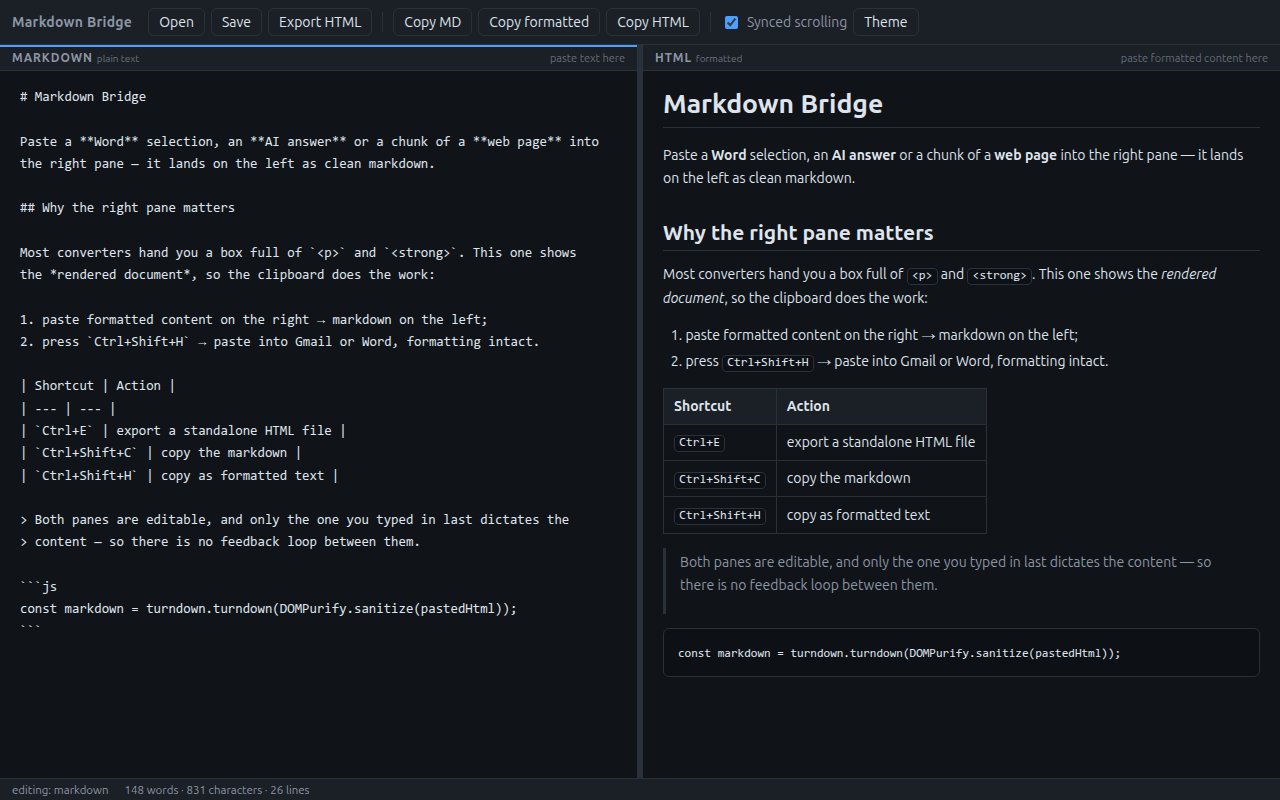
Markdown Bridge is a two-pane editor, and the only truly important decision in it is this one: the right pane does not show the HTML, it shows the formatted document.
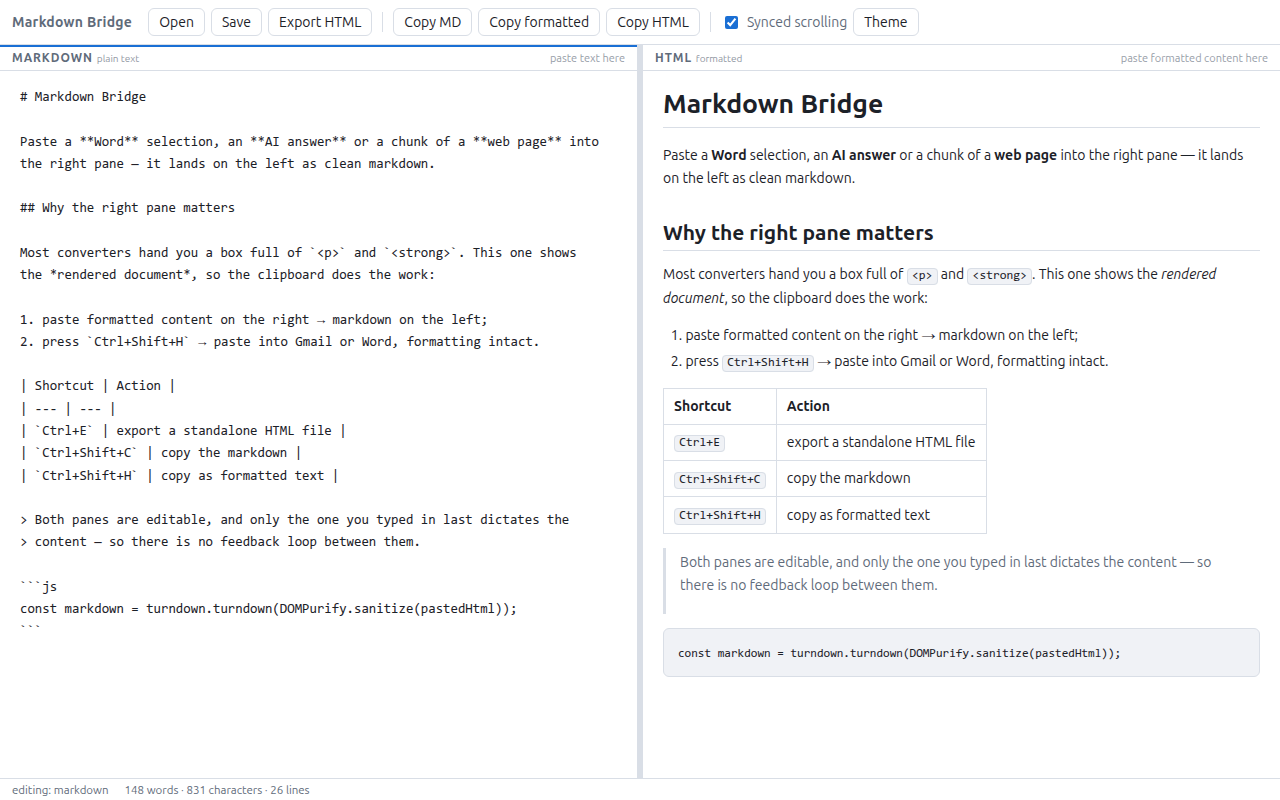
It looks like an aesthetic choice. It is a choice about the input and output interface, and it changes both gestures.
On the way in, the right pane is a contenteditable — as far as the operating system
is concerned, it is a rich text editor, just like the body of an e-mail. So when you paste
something there, the clipboard hands over the text/html, which is the format every
decent application puts there alongside the plain text. Word, Google Docs, browsers,
e-mail clients, AI chat interfaces: they all publish text/html. It just tends to be
ignored, because almost no text field knows what to do with it.
Here that is exactly the raw material. You select in Word, hit Ctrl+C, click on the right, hit Ctrl+V — and the markdown shows up on the left, with headings, bold, lists, links and tables preserved. No "export" step, no intermediate file to save, no hunting for "view source".
On the way out, the same reasoning in reverse. Ctrl+Shift+H copies the right pane as
formatted text — the app writes text/html and text/plain to the clipboard at once:
await navigator.clipboard.write([
  new ClipboardItem({
    "text/html": new Blob([html], { type: "text/html" }),
    "text/plain": new Blob([previewEl.innerText], { type: "text/plain" }),
  }),
]);
You paste it into Gmail and it arrives formatted. Paste it into Word and it arrives
formatted. Paste it into a terminal and it arrives as clean text, because whoever receives
it picks the format they know how to read. It is the behaviour any rich editor has — and
that no markdown converter offers, because their content is a string of tags inside a
<textarea>.
The three paths I actually use
AI answer → documentation. Chat tools render markdown on screen and, when you copy,
hand over HTML in the clipboard. Copying straight into a .md file usually loses the
structure or drags in interface artifacts. Pasting into the right pane gives the markdown
back, clean, ready to commit.
Corporate document → wiki. The .docx that circulates by e-mail with headings, lists
and a table. Select everything, paste, save as .md. What survives is the structure; what
dies is the font-family: Calibri on every paragraph.
Markdown → e-mail. The reverse path, and the most underrated one. You write — or
already have in the repository — a text in markdown, and you need to send it to someone who
expects a formatted e-mail, not ## like this. Write on the left, Ctrl+Shift+H, paste
into Outlook.
Under the hood: the loop that does not exist
Technically, the app is small and unceremonious: Electron, no framework, no bundler, no
build step. marked does markdown → HTML,
turndown with the GFM plugin does HTML →
markdown, and DOMPurify sanitizes everything that
comes in.
The interesting problem in an editor with two editable panes is not the conversion — the libraries handle that. It is the feedback. If markdown generates HTML and HTML generates markdown, the cycle closes: each update on one side triggers the other, which triggers the first one again. At best the cursor jumps; at worst the text degrades on every round trip, because no round-trip conversion is perfectly idempotent.
The usual solution is a flag: iAmUpdating = true, do the update, iAmUpdating = false.
It works, but it is the kind of state that ages badly — one new asynchronous path is enough
for the flag to get stuck and the app to freeze silently.
Here the guarantee comes from a property of the DOM: the input event is only born from
a user edit. Writing to el.value or to el.innerHTML from code fires no input at all.
So the app only has to mark who received the last input and let that pane dictate the
content:
mdEl.addEventListener("input", () => {
  setSource("md");
  fromMarkdown(); // markdown → preview
});

previewEl.addEventListener("input", () => {
  setSource("html");
  fromHtml(); // preview → markdown
});
And the functions that update the other side write to it directly, without ceremony:
const renderPreview = () => {
  previewEl.innerHTML = toHtml(mdEl.value);
};
const renderMarkdown = () => {
  mdEl.value = toMarkdown(previewEl.innerHTML);
};
Neither of those two lines fires input, so neither of them hands control back to the other
pane. The loop is not broken — it never comes into existence. And, as a free consequence, the
cursor of whoever is typing is never repositioned by an update coming from the other side.
Pasting is always third-party content
An app whose job is to receive content pasted from anywhere is, by definition, processing
untrusted input. The text/html from the clipboard comes with inline style, onclick
handlers, sometimes <script> — most of it is editor debris, but it only takes one case not
to be.
That is why DOMPurify sits on every input path into the preview, not only on the paste
one: rendered markdown, pasted HTML and hand-typed HTML all go through the same filter, which
strips script, style, iframe, on* attributes and javascript: URLs. On top of that,
nodeIntegration off, contextIsolation on, a CSP with default-src 'none', and external
links opening in the default browser, never inside the window.
The smoke test checks this directly: it pastes a <script>alert(1)</script> and renders a
[x](javascript:alert(1)), and fails if either of them survives.
It is live
Markdown Bridge is open source under the MIT license, at github.com/oscardias/markdown-bridge. There are binaries for Linux, Windows and macOS in the releases, or:
git clone https://github.com/oscardias/markdown-bridge.git
cd markdown-bridge
npm install
npm start
Issues and pull requests are welcome — especially reports of pastes that go wrong. The
text/html each application publishes to the clipboard varies in ways no documentation
covers, and the only way to improve that part is to see the real cases.